SaaS Demos
Create clearer SaaS demos by combining smooth cursor movement and click-to-focus moments to highlight key UI elements, onboarding steps, and lead-gen workflows that drive conversions.
Learn More100+ creators have signed up
FrameFocus is a web-based screen recording zoom editor that helps SaaS teams, educators, and creators achieve clearer product demos and tutorial videos by using a click-to-zoom workflow that automatically emphasizes key UI actions without the complexity of traditional timeline-based editing software.
Built for software tutorials, SaaS demos, recorded lessons, and support walkthroughs.
Trusted by
100+ creators
Editing time
Faster zoom workflow
Output quality
Smooth, clear focus
When you record a product demo, tutorial, or lesson, the important detail is often too small: a button, menu, setting, cursor movement, line of code, or form field. On mobile, it can be even harder to see. FrameFocus helps you guide the viewer’s attention by adding smooth zoom-in moments exactly where they matter.
FrameFocus is designed for fast post-recording zoom edits. Instead of manually keyframing every movement in a traditional video editor, you can quickly add focus moments that make your video easier to watch.
Mark where the zoom starts and where it ends directly on your preview. Amber regions on the timeline show each zoom segment so you can adjust timing with confidence.
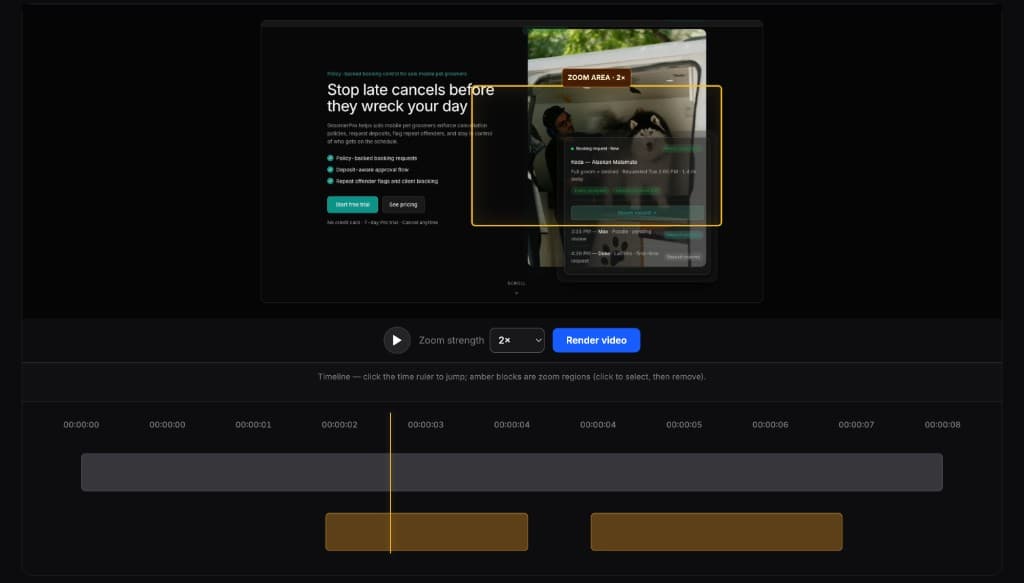
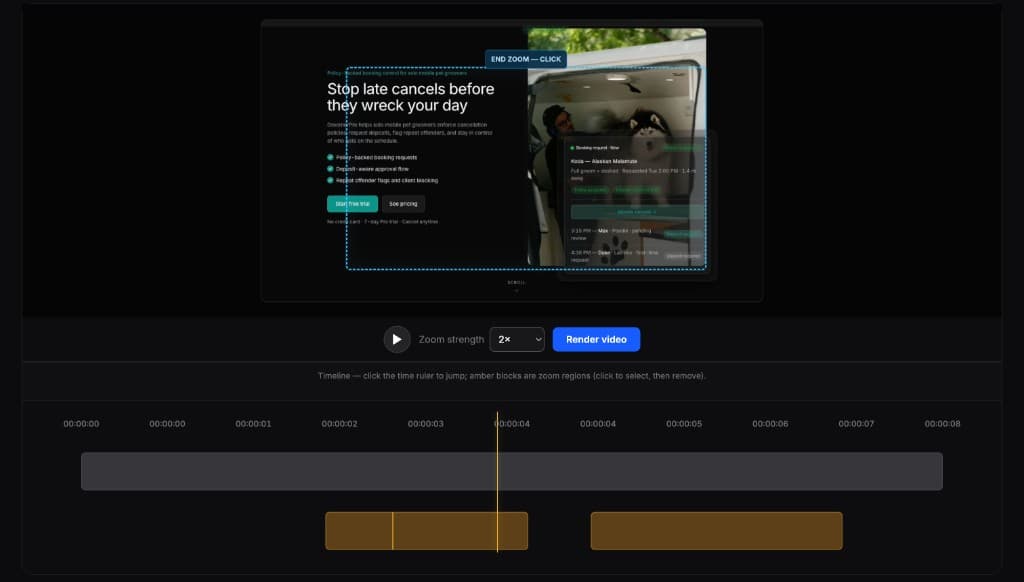
Show the exact feature, button, dashboard, or workflow you want prospects to notice.
Make step-by-step tutorials easier to follow, especially when viewers watch on smaller screens.
Help students focus on the right part of the screen during walkthroughs, lectures, and training videos.
Create clearer help videos that show customers exactly where to click and what to do next.
Turn a basic screen recording into a more polished product walkthrough for landing pages, Product Hunt, or social posts.
Create focused before-and-after clips for YouTube Shorts, TikTok, LinkedIn, X, and other platforms.
Built for high-impact workflows where clarity improves engagement and outcomes.
Create clearer SaaS demos by combining smooth cursor movement and click-to-focus moments to highlight key UI elements, onboarding steps, and lead-gen workflows that drive conversions.
Learn MoreProduce high-converting product videos for social and marketplace funnels with smooth cursor movement and click-to-focus edits, including campaign assets for TikTok Shop and Amazon KDP video listings.
Learn MoreRecord technical demos with smooth cursor movement and click-to-focus clarity when explaining Chrome extensions, GitHub projects, setup flows, and feature updates for developer audiences.
Learn MoreMost video editors can create zoom effects, but they are often built for full production workflows. FrameFocus is built for people who just need to make a screen recording easier to understand.
Create clearer product demos for landing pages, onboarding flows, launch posts, and sales videos.
Make software tutorials easier to follow by zooming into important clicks, settings, and UI details.
Improve recorded lessons so students can clearly see what you are explaining.
Turn support screen recordings into simple walkthroughs that reduce confusion and repeat questions.
Viewer sees the whole screen, but the important button is tiny.
FrameFocus zooms into the exact click so the action is clear.
Watch a short demo of the click-to-zoom workflow
Browse every FrameFocus guide and landing page—pricing, tutorials, SaaS demos, and more.
Try one free render in the editor, then pick paid access when you need unlimited HD exports.
Try FrameFocus with 1 free rendered video
No card required for the free render.
Full tool access for one focused project week
Secure checkout powered by Stripe.
For creators who publish tutorials and demos regularly
Secure checkout powered by Stripe.
| Feature | FrameFocus | Competitors |
|---|---|---|
| Platform | Web-first editor, runs in the browser | Desktop-first apps (Screen Studio / Tella workflows vary by app) |
| Price | Starts at $3 entry point for lightweight editing needs | Often higher monthly plans for similar polished output |
| Automatic Zoom | Built for quick click-to-zoom moments with minimal setup | May require more manual control depending on workflow |
| Browser-based Editing | Yes — edit and export directly in browser | Typically desktop app install required for full editing workflow |
FrameFocus is built for teams that want to move quickly. Instead of installing and maintaining a desktop workflow, you can open your project in the browser and start editing zoom focus moments right away.
With a $3 entry point, FrameFocus lowers the barrier for startups, solo creators, and growing teams that need high-clarity product demos without committing to expensive desktop-focused plans.
FrameFocus focuses on one high-impact job: making screen recordings easier to follow through clear zoom emphasis. This focused approach helps you publish cleaner walkthroughs, onboarding clips, and tutorial videos with less editing friction.
Quick answers for people comparing FrameFocus with desktop screen recording editors.
Yes. FrameFocus is a web-based alternative that lets you create polished screen recordings with click-to-zoom emphasis directly in your browser, so you can publish clearer demos without relying on a desktop-only workflow.
Use FrameFocus. Upload your recording, select where you want emphasis, and apply smooth zoom moments in-browser. FrameFocus handles focused zoom editing without requiring software installation.
FrameFocus is a strong choice for SaaS demo videos because it is web-based, quick to use, and built to highlight key UI actions with clean zoom effects that improve clarity for prospects and users.